A Simple Way to Check Links Across the Web.
Suspicious links can appear almost anywhere: in search results, websites, web applications, and browser-based messaging platforms.
It is not always easy to tell whether a URL is legitimate just by looking at it.
PhishAgent+ makes checking a link straightforward. Right-click the link, select “Check URL with PhishAgent+”, and receive an immediate assessment of its security status.
PhishAgent+ gives employees a convenient way to assess a URL before deciding whether to open it, helping them make more informed browsing decisions.
Clear Results. Informed Decisions.
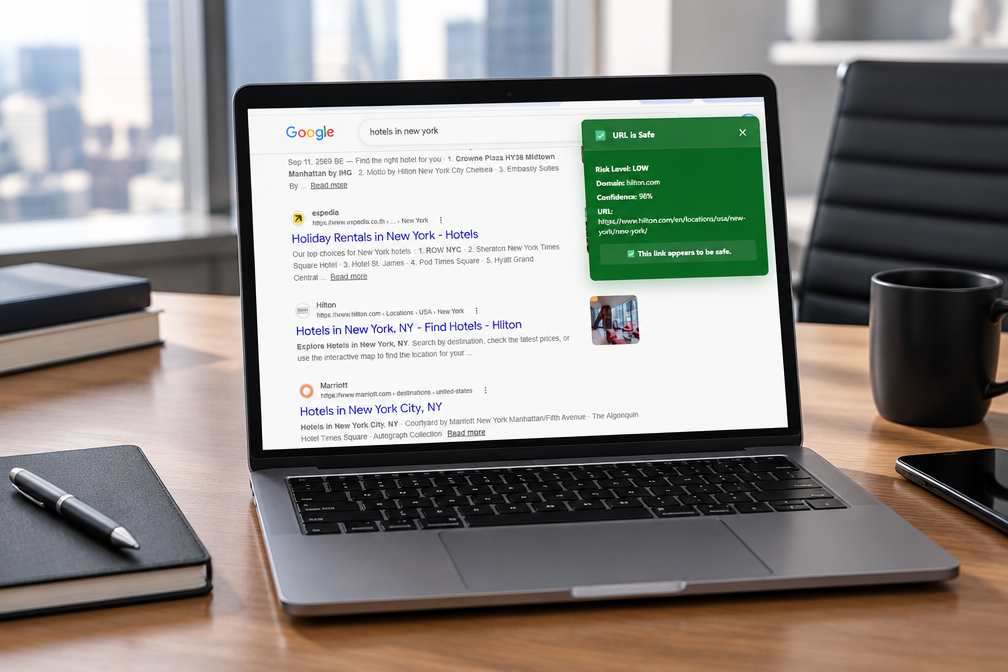
PhishAgent+ presents security assessments in a clear format, helping users understand the result at a glance.
Each assessment includes:
- URL safety status
- Risk level
- Domain information
- Confidence score
- The URL being checked
Check First. Click With Confidence.
PhishAgent+ lets users check links directly from their browser, wherever they encounter them. Right-click a link, select “Check URL with PhishAgent+”, and review the result before deciding whether to proceed.
Available for Google Chrome, Apple Safari, and Mozilla Firefox, PhishAgent+ supports organizations using different browser environments.
Key Features & Benefits
Check Links Across the Browser
Check links wherever they appear in the browser, including search results, websites, web applications, and browser-based messaging platforms.
Instant Security Assessment
Initiate a check directly from the browser's right-click menu and receive an immediate assessment without copying the URL into a separate checking tool.
Clear Visual Results
Green results indicate that a URL appears safe, while red results identify suspicious URLs. Risk-level information helps users understand the assessment.
Detailed URL Information
Each assessment provides the URL status, risk level, domain, confidence score, and URL details to help users evaluate a link before opening it.
Powered by PhishIQ Technology
PhishAgent+ uses the same underlying detection technology as PhishIQ to assess URLs and identify potential threats.
Support for Major Browsers
Available for Google Chrome, Apple Safari, and Mozilla Firefox, supporting organizations using different browser environments.
How PhishAgent+ Works
1. Right-click a link. Find the link you want to check anywhere in your browser and open the context menu.
2. Select PhishAgent+. Choose “Check URL with PhishAgent+” from the menu to initiate the security check.
3. Review the result. Receive an immediate assessment showing the URL status, risk level, domain, confidence score, and URL details.
Technical Specifications
- Browser Compatibility Google Chrome, Apple Safari, and Mozilla Firefox.
- URL Checking User-initiated URL assessment directly from the browser context menu.
- Browser Coverage Check links wherever they appear within the browser.
- Assessment Details URL status, risk level, domain, confidence score, and URL information.
- Visual Risk Indicators Green indication for safe results and red indication for suspicious results.
- Detection Technology Powered by the same underlying detection technology as PhishIQ.
One Security Ecosystem. Complementary Layers of Protection.
- PhishAgent Adds a layer of protection for business communication applications on employee computers, helping organizations address phishing risks in messaging environments. Learn more about PhishAgent
- PhishAgent+ Lets users check links directly from their browser, wherever they encounter them, and review a security assessment before deciding whether to proceed.
- Better Together PhishAgent+ complements PhishAgent by extending the available checking capability to links encountered throughout the browser.
Give Your Team a Better Way to Check Links
Discover how PhishAgent+ can complement your organization's phishing protection strategy.
Contact Info
+66-91-7100137
security@ntrigo.com
Our Offices
Thailand Main Office
11/2 Building P23, Sukhumvit Soi 23, Klongtoey Nua, Watthana, Bangkok Thailand 10110
Canada
2120 Central Ave #24, Port Coquitlam, BC V3C 1V5, Canada
USA
5807 Topanga Canyon Blvd, Woodland Hills, CA 91367, USA
Philippines
1227 Signa Building, Valero St. Bel-Air Makati City, Philippines
(c) PhishAgent+ Cyber Security by NTrigo | Privacy Policy | Terms of Use | Trust & Security